Netty(二) — Pipeline和Handler
分析了 Netty 中 ChannelPipeline、ChannelHandler、ChannelHandlerContext 各自的作用和实现原理,重点讲了下解码器基类 ByteToMessageDecoder 是怎么解决粘包/拆包的问题以及在实际使用时该如何考虑。最后用一张流程图总结了这三个核心组件在实际数据处理过程中的组合和协作方式
ChannelPipeline
ChannelPipeline是 Netty 中用于处理 I/O 事件和数据流的核心组件,表示 Channel 的事件处理链。每个 Channel 都绑定一个唯一的 ChannelPipeline,它实现了 ChannelInboundInvoker 和 ChannelOutboundInvoker 接口,默认实现类为 DefaultChannelPipeline。这个工具主要做两件事:
维护ChannelHandler的双向链表结构
添加、移除、和替换Handler,并触发相关的事件(handlerAdded、handerRemoved)
传播所有出入站事件
- outbound从tail开始传播
- inbound从head开始传播
核心方法
public class DefaultChannelPipeline implements ChannelPipeline {
    // 固定的head,实现为HeadContext
    final AbstractChannelHandlerContext head;
    // 固定的tail,实现为TailContext
    final AbstractChannelHandlerContext tail;

    // 和当前pipeline关联的Channel
    private final Channel channel;

     public final ChannelPipeline addFirst(EventExecutorGroup group, String name, ChannelHandler handler) {
        final AbstractChannelHandlerContext newCtx;
        synchronized (this) {
            // 检查这个handler是否可以被多线程共享(被@Sharable标记)。避免多实例共享了不可共享的对象
            // 也就是handler默认下是每个Channel使用一个
            checkMultiplicity(handler);
            // 创建唯一的name并检查重名
            name = filterName(name, handler);
            // 创建handlerContext
            newCtx = newContext(group, name, handler);
            // 作为head的下一个节点
            addFirst0(newCtx);

            if (!registered) { // 表示当前channel还未注册到eventLoop中,添加个handlerAdded的回调接口就直接返回
                newCtx.setAddPending();
                callHandlerCallbackLater(newCtx, true);
                return this;
            }
            // channel已经注册到eventLoop中,根据当前线程是否是eventLoop线程来决定是否直接调用handlerAdded事件
            EventExecutor executor = newCtx.executor();
            if (!executor.inEventLoop()) {
                callHandlerAddedInEventLoop(newCtx, executor);
                return this;
            }
        }
        callHandlerAdded0(newCtx);
        return this;
    }
}
ChannelHandler
是所有Handler的顶层接口。内部定义了个@Sharable注解,表示只有加了这个注解的 Handler,才能被多个 Channel 共享使用
除了这个,ChannelHandler还定义了两个常见的生命周期回调:
handlerAdded:当前Handler被添加到ChannelPipeline里,且对应的Channel已注册到EventLoop后调用
handlerRemoved:当前Handler从ChannelPipeline中移除后,且Channel已注册到EventLoop后调用
ChannelInboundHandler
这是入站事件的接口,也就是那些 外部(客户端)进来的操作,大多数方法(比如注册、激活)只会触发一次,而像 channelRead、userEventTriggered 这种则可能多次触发
重点关注如下两个方法
channelRead:从Socket中读取数据(多次触发)
- SocketChannel的一次请求可能由于网络的拆包、预分配的ByteBuf容量不够等原因触发多次channelRead。其参数msg是Object类型的,是因为这次读取可能是解码后的结果(如果是ByteBuf对象,则表示还未解码完毕)。这也是业务Handler的主要实现接口,很多自定义逻辑都会放在这里处理读取到的消息。触发点为NioByteUnsafe#read
- ServerSocketChannel在这里处理与客户端创建的连接对象,所以其msg是SocketChannel。触发点为NioMessageUnsafe#read
channelReadComplete:本轮读取完毕后触发(一次)
所有可读的字节都已经从 Channel 中读取之后,将会调用该方法。一般可以再这个方法里对Socket进行wirte和flush了
public interface ChannelInboundHandler extends ChannelHandler {
    // 当前Channel注册到Selector时触发(此时还未注册感兴趣的事件)
    void channelRegistered(ChannelHandlerContext ctx) throws Exception;

    // 当前Channel从Selector注销时触发
    void channelUnregistered(ChannelHandlerContext ctx) throws Exception;

    // 当前Channel激活时触发。
    // 对于ServerSocketChannel,表示绑定了地址和端口。对于SocketChannel,代表已经连接了服务端
    void channelActive(ChannelHandlerContext ctx) throws Exception;

    // Channel 变为非活跃状态时触发,比如连接断开了
    void channelInactive(ChannelHandlerContext ctx) throws Exception;

    // 从Socket中读取数据
    void channelRead(ChannelHandlerContext ctx, Object msg) throws Exception;

    // 一次读操作完成时触发(意味着 channelRead 不会再进来了)
    void channelReadComplete(ChannelHandlerContext ctx) throws Exception;

    // 用户定义的事件触发(比如检测心跳连接事件)
    void userEventTriggered(ChannelHandlerContext ctx, Object evt) throws Exception;

    void channelWritabilityChanged(ChannelHandlerContext ctx) throws Exception;

    // 异常触发
    @Override
    @SuppressWarnings("deprecation")
    void exceptionCaught(ChannelHandlerContext ctx, Throwable cause) throws Exception;
}
ByteToMessageDecoder
是解码器的顶级抽象类,用于处理 TCP 拆包/粘包问题。通过重写 ChannelInboundHandler#channelRead 方法,实现将入站的 ByteBuf 解码为业务需要的消息对象。
内部的cumulation字段为累积的ByteBuf缓冲区,通过内置的MERGE_CUMULATOR将其和本次读取到的ByteBuf进行合并(分配一个新的ByteBuf,将旧的cumulation和本次的ByteBuf复制进来,最终替换为新的cumulation)。
ByteToMessageDecoder#decode这个模板方法是子类解码器需要唯一实现的接口。子类只需根据自己的协议来尝试解码,每次decode应该只尝试解析一次请求的数据,具体考虑如下:
- ByteBuf数据不够(拆包):不做任何处理,保留数据等待下一次读事件触发
- ByteBuf可读字节数 >= 当前请求的数据(粘包):说明至少包含一个完整的报文,进行解码并将解码后的数据放入out这个List中。(不需要一次解码全部数据,多余的数据等待下次decode再进行解析)
所以,通过ByteToMessageDecoder的功能可以推断出其不能在Channel中共享(构造方法中校验)。而且,应该将其放在Pipeline中尽量靠近head的位置,尽早完成 ByteBuf 到业务对象的转换,方便后续 Handler 的处理
核心方法
public abstract class ByteToMessageDecoder extends ChannelInboundHandlerAdapter {

    // 累积的ByteBuf缓冲区
    ByteBuf cumulation;
    // ByteBuf合并器
    private Cumulator cumulator = MERGE_CUMULATOR;
    // 是否是一次请求中的第一次读取
    private boolean first;
    private int discardAfterReads = 16;
    private int numReads;

    protected ByteToMessageDecoder() {
        // 解码器一定不能被多个Channel共享,否则就可能读到多个Channel的数据
        ensureNotSharable();
    }

    /**
     * ByteBuf合并器,通过合并两个ByteBuf返回一个新的ByteBuf
     */
    public static final Cumulator MERGE_CUMULATOR = new Cumulator() {
        @Override
        public ByteBuf cumulate(ByteBufAllocator alloc, ByteBuf cumulation, ByteBuf in) {
            try {
                final ByteBuf buffer;
                // cumulation这个ByteBuf容量不够了 或被多个Handler引用了或只读模式,都需要新建一个扩容后的ByteBuf
                if (cumulation.writerIndex() > cumulation.maxCapacity() - in.readableBytes()
                        || cumulation.refCnt() > 1 || cumulation.isReadOnly()) {
                    // 使用ByteBufAllocator分配新的更大容量的ByteBuf,并将cumulation写入到新的ByteBuf中
                    buffer = expandCumulation(alloc, cumulation, in.readableBytes());
                } else {
                    buffer = cumulation;
                }
                buffer.writeBytes(in);
                return buffer;
            } finally {
                in.release();
            }
        }
    };


    public void channelRead(ChannelHandlerContext ctx, Object msg) throws Exception {
        if (msg instanceof ByteBuf) {
            // 这个out的数据结构就是我们解码后存放解码对象的容器(因为一次read可能解码出多条数据,所以需要List结构)
            CodecOutputList out = CodecOutputList.newInstance();
            try {
                ByteBuf data = (ByteBuf) msg;
                first = cumulation == null;
                if (first) { // 第一次读
                    cumulation = data;
                } else { // 代表不是第一次读取了,可能由拆包,现需要组合两个ByteBuf
                    cumulation = cumulator.cumulate(ctx.alloc(), cumulation, data);
                }
                // 开始尝试解码
                callDecode(ctx, cumulation, out);
            } catch (DecoderException e) {
                throw e;
            } catch (Exception e) {
                throw new DecoderException(e);
            } finally {
                if (cumulation != null && !cumulation.isReadable()) { // 数据读完了,需要释放
                    numReads = 0;
                    cumulation.release();
                    cumulation = null;
                } else if (++numReads >= discardAfterReads) {
                    // 默认连续读了16次都没有完全读完数据,就丢弃一部分已读的数据以免内存溢出
                    // 出现这种情况一般都是一直有拆包,导致每次读取的ByteBuf组合后都不能完全解码掉
                    numReads = 0;
                    discardSomeReadBytes();
                }

                int size = out.size();
                decodeWasNull = !out.insertSinceRecycled();
                fireChannelRead(ctx, out, size); // 存在解码后的数据才会将解码对象向后传播
                out.recycle(); // 到了这里,out一定为空了,回收当前的CodecOutputList以便下次使用
            }
        } else { // 说明已经被解码了,直接向后传递msg
            ctx.fireChannelRead(msg);
        }
    }

    protected void callDecode(ChannelHandlerContext ctx, ByteBuf in, List<Object> out) {
        try {
            while (in.isReadable()) { // 只要还有数据可读,就应该继续尝试解码
                int outSize = out.size();

                if (outSize > 0) { // 有解码后的数据,应该通过调用channelRead来处理这些数据
                    fireChannelRead(ctx, out, outSize);
                    out.clear(); // 传播完了,清空容器,等待后续可能的添加

                    if (ctx.isRemoved()) {
                        break;
                    }
                    outSize = 0;
                }
                // 可读的字节数
                int oldInputLength = in.readableBytes();
                // 让子类取去尝试解码
                decodeRemovalReentryProtection(ctx, in, out);
                if (ctx.isRemoved()) {
                    break;
                }

                if (outSize == out.size()) { // 没有解码出数据
                    if (oldInputLength == in.readableBytes()) { // 没有解码数据,代表可能拆包了,还不够一次的数据。
                        // 跳出循环,等待下一次的channelRead一起处理数据
                        break;
                    } else {
                        continue;
                    }
                }

                if (oldInputLength == in.readableBytes()) {
                    throw new DecoderException(
                            StringUtil.simpleClassName(getClass()) +
                                    ".decode() did not read anything but decoded a message.");
                }

                if (isSingleDecode()) {
                    break;
                }
            }
        } catch (DecoderException e) {
            throw e;
        } catch (Exception cause) {
            throw new DecoderException(cause);
        }
    }

    // 模板方法接口,等待子类去实现真正的解码,如果有待解码的数据,就将ByteBuf读取并进行解码,再将解码后的数据放入out就行
    // 如果没有待解码的数据(可能网络的拆包导致数据不完整),不用做任何操作
    protected abstract void decode(ChannelHandlerContext ctx, ByteBuf in, List<Object> out) throws Exception;
}
常见解码器
FixedLengthFrameDecoder
固定长度帧解码器。通过构造方法指定帧长 frameLength,每次从 ByteBuf 中读取固定字节数作为一帧进行解码
LineBasedFrameDecoder
行分隔符解码器。以换行符 \n(或 \r\n)作为帧的结束标志,适用于基于文本行的协议解析
DelimiterBasedFrameDecoder
分隔符解码器。支持自定义一个或多个分隔符(ByteBuf 类型)作为帧边界,从 ByteBuf 中提取每帧数据
LengthFieldBasedFrameDecoder
比上面三个都更加灵活的解码器,基于某个字段指定整帧长度的通用解码器。重要参数如下
- maxFrameLength:最大帧长度,超过此长度的帧将被丢弃
- lengthFieldOffset:长度域偏移。就是说数据开始的几个字节可能不是表示数据长度,需要后移几个字节才是长度域。
- lengthFieldLength:长度域字节数。用几个字节来表示数据长度。
- lengthAdjustment:数据长度修正。因为长度域指定的长度可以是header + body的整个长度,也可以只是body的长度。如果表示header+body的整个长度,那么我们需要修正数据长度。
- initialBytesToStrip:跳过的字节数。如果你需要接收header+body的所有数据,此值就是0,如果你只想接收body数据,那么需要跳过header所占用的字节数。
ChannelOutboundHandler
这是出站事件的接口,也就是我们主动发起的操作。大多数方法(比connect、bind、read)只会触发一次,而像 write、flush 才可能多次触发
public interface ChannelOutboundHandler extends ChannelHandler {

    // Channel绑定到本地地址时触发(仅ServerSocketChannel触发一次)
    void bind(ChannelHandlerContext ctx, SocketAddress localAddress, ChannelPromise promise) throws Exception;

    // 当 SocketChannel 连接远程地址时触发,仅触发一次
    // 触发地点:Bootstrap#doConnect
    void connect(
            ChannelHandlerContext ctx, SocketAddress remoteAddress,
            SocketAddress localAddress, ChannelPromise promise) throws Exception;

    // 主动断开连接时触发(如 SocketChannel.disconnect())
    void disconnect(ChannelHandlerContext ctx, ChannelPromise promise) throws Exception;

    void close(ChannelHandlerContext ctx, ChannelPromise promise) throws Exception;

    void deregister(ChannelHandlerContext ctx, ChannelPromise promise) throws Exception;

    // 开始监听感兴趣的 IO 事件:
    // - 对 ServerSocketChannel 是 ACCEPT 事件
    // - 对 SocketChannel 是 READ 事件
    void read(ChannelHandlerContext ctx) throws Exception;

    // 写数据到 Channel 的缓冲区,仅适用于 SocketChannel
    void write(ChannelHandlerContext ctx, Object msg, ChannelPromise promise) throws Exception;

    // 将缓冲区中的数据刷新到底层网络,仅适用于 SocketChannel
    void flush(ChannelHandlerContext ctx) throws Exception;
}
MessageToByteEncoder
是出站方向编码器的抽象基类,相比解码器其逻辑更简单,没有太多复杂场景。
子类只需实现encode这个模板方法,将消息对象 msg 编码为二进制数据写入 out 即可,Netty 会负责后续的写出逻辑
public abstract class MessageToByteEncoder<I> extends ChannelOutboundHandlerAdapter {
    public void write(ChannelHandlerContext ctx, Object msg, ChannelPromise promise) throws Exception {
        ByteBuf buf = null;
        try {
            if (acceptOutboundMessage(msg)) { // msg类型匹配
                I cast = (I) msg;
                // 分配一个空的 ByteBuf(preferDirect 表示是否优先使用直接内存)
                buf = allocateBuffer(ctx, cast, preferDirect);
                try {
                    // 子类实现。将消息编码写入到ByteBuf中
                    encode(ctx, cast, buf);
                } finally {
                    ReferenceCountUtil.release(cast);
                }

                if (buf.isReadable()) { // buf被写入了数据,即编码了。触发write操作
                    ctx.write(buf, promise);
                } else { // 释放
                    buf.release();
                    ctx.write(Unpooled.EMPTY_BUFFER, promise);
                }
                buf = null;
            } else {
                // 不是对应的编码器,则向前继续传递
                ctx.write(msg, promise);
            }
        } catch (EncoderException e) {
            throw e;
        } catch (Throwable e) {
            throw new EncoderException(e);
        } finally {
            // 兜底释放资源
            if (buf != null) {
                buf.release();
            }
        }
    }
}
ChannelHandlerContext
ChannelHandlerContext 是每个 ChannelHandler 的上下文容器,本质上是 Netty 中 ChannelPipeline 双向链表结构的一个节点(Node),其默认实现类为DefaultChannelHandlerContext
它不仅维护了当前 Handler 的状态信息,还实现了 ChannelInboundInvoker 和 ChannelOutboundInvoker 接口,具备将入站、出站事件沿链路传递到下一个合适的 Handler 的能力
核心字段
// 当前 Context 所包装的 ChannelHandler
private final ChannelHandler handler;
// 指向下一个 HandlerContext,入站使用
volatile AbstractChannelHandlerContext next;
// 指向前一个 HandlerContext,出站使用
volatile AbstractChannelHandlerContext prev;

// 能否处理inbound事件
private final boolean inbound;
// 能否处理outbound事件
private final boolean outbound;
private final DefaultChannelPipeline pipeline;
// 当前handler的名字
private final String name;
/**
 * 当前 handler 是否应按顺序触发事件,一般都为true
 *
 * 为 true 时,只有在 handler 被完整添加到 Pipeline 并执行了 handlerAdded() 回调后,
 * 才会触发该 handler 的其他事件(如 channelRead 等)
 *
 * 如果为 false,即便 handlerAdded() 尚未被调用,只要已添加到 Pipeline 中,
 * 就允许立即触发其事件方法。通常用于一些内部 handler 的优化场景
 */
private final boolean ordered;

// handler 已添加到 pipeline 中,但尚未调用 handlerAdded(即还未激活)
private static final int ADD_PENDING = 1;
// handler 已添加到 pipeline 且 handlerAdded 已调用(已激活)
private static final int ADD_COMPLETE = 2;
// handler 已从 pipeline 中移除,不能再触发事件
private static final int REMOVE_COMPLETE = 3;
// 初始化状态
private static final int INIT = 0;
// 当前context的状态
private volatile int handlerState = INIT;
特殊的HandlerContext
在 Netty 的 ChannelPipeline 中,除了我们自定义的 ChannelHandlerContext ,框架还内置了两个特殊的 Context:HeadContext 和 TailContext,分别作为出站和入站事件处理链的起始和终点,对事件传播机制进行收尾
HeadContext
出站事件链的终点,负责将最终的出站操作(如connect、bind、write、flush等)委托给底层的 Channel.Unsafe
虽然也实现了ChannelInboundHandler,但对入站事件基本没特殊的处理,仅向后续的Handler传播
TailContext
入站事件链的终点,通常用于收尾处理,例如资源释放、日志记录等(如入站事件的异常(exceptionCaught)如果不做任何处理,继续向后传播的话,最终也只会记录日志,并不会抛出异常)
总结
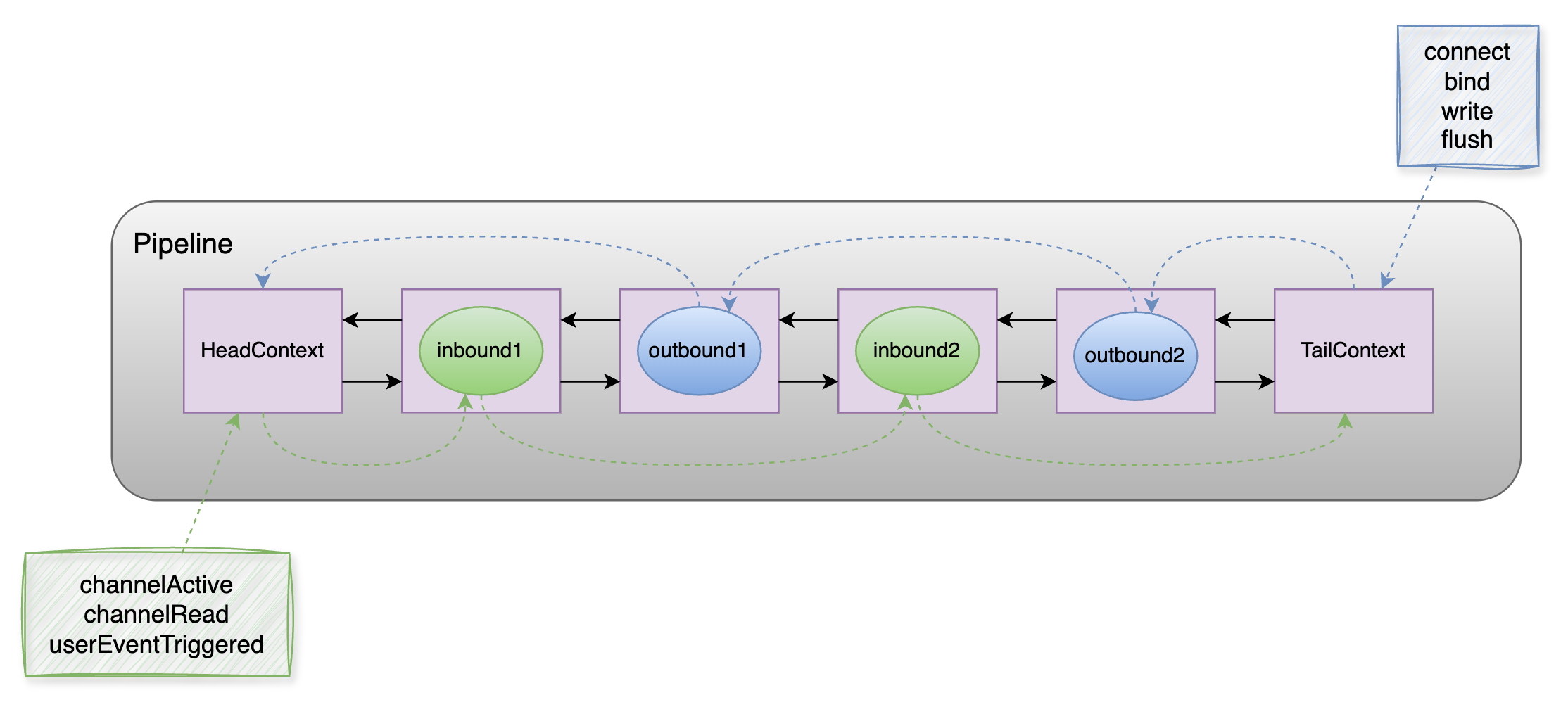
Pipeline + Handler是基于责任链模式设计的,主要用于网络事件的传递、处理和拦截。类似于Tomcat的Pipeline + Value。但 Netty 更底层、通用,它既能作为服务端,也可以作为客户端使用。
Netty将网络通信中的被动接收和主动发起相关IO操作抽象成了inbound和outbound事件,使其在对应的handler中传递,具体为:
出站(outbound):tail → …各种OutboundHandler → head。bind, connect, write, flush等主动触发的IO操
入站(inbound):head → …各种InboundHandler → tail。channelRead,channelActive, channelRegistered等被动接收的IO操作
同时它基于自身的架构设计了顶层的解码器ByteToMessageDecoder帮我们解决了网络中拆包粘包的问题,使我们在使用过程中只需关注具体的协议解析和业务处理部分
Handler使用tips
- Handler 的添加顺序决定其在 Pipeline 中的执行顺序,会影响事件的处理逻辑。使用时需根据具体依赖关系进行编排,比如:解码器应在业务处理器之前,编码器应在之后
- Handler 默认不可复用(每个 Channel 一个实例)。如果 Handler 是线程安全的,可以加 @ChannelHandler.Sharable 注解,让这个Handler实例在多个Channel中共享使用